

Twenty employees rarely strain a support setup that was thrown together in a company’s first year. A hundred and fifty employees usually do. Somewhere in between, the informal system, shared logins, one overworked IT generalist, a tool nobody quite remembers choosing, stops being a minor inconvenience and starts costing real time, both in delayed tickets and in the quiet frustration of employees who stop bothering to report small problems at all.
Choosing remote support software for growing businesses before that breaking point arrives is far cheaper than replacing a system after it has already buckled under headcount growth.
Industry staffing benchmarks put the ratio of IT support staff to employees at roughly 1:18 for companies under 500 people, climbing toward 1:25 or higher as organizations scale into the thousands. Every point along that curve represents a moment where the tools supporting IT either kept pace with growth or quietly fell behind it.
Key Takeaways
- Remote support needs change in kind, not just in volume, as a company moves from a handful of employees to several hundred.
- According to MSH’s IT staffing benchmark research, IT staffing ratios shift from roughly 1:18 at smaller companies toward 1:25 or higher at scale, meaning each support person covers more ground.
- The right buying decision weighs authentication, scalability, and integration with existing systems, not just price per seat.
- Remote employees typically submit a higher volume of tickets than on-site staff, a detail worth budgeting for directly.
- A tool chosen without room to grow often gets replaced within a year or two, costing more than choosing carefully upfront.
Why This Purchase Gets Harder to Reverse as You Grow
A remote support tool picked for five people is a minor decision. The same tool, still in place at two hundred people, has become infrastructure that touches onboarding, security policy, and daily productivity. Ripping it out and starting over gets more disruptive with every employee added in the meantime, since each new hire represents another account, another set of habits, and another migration headache if the switch happens later rather than sooner.
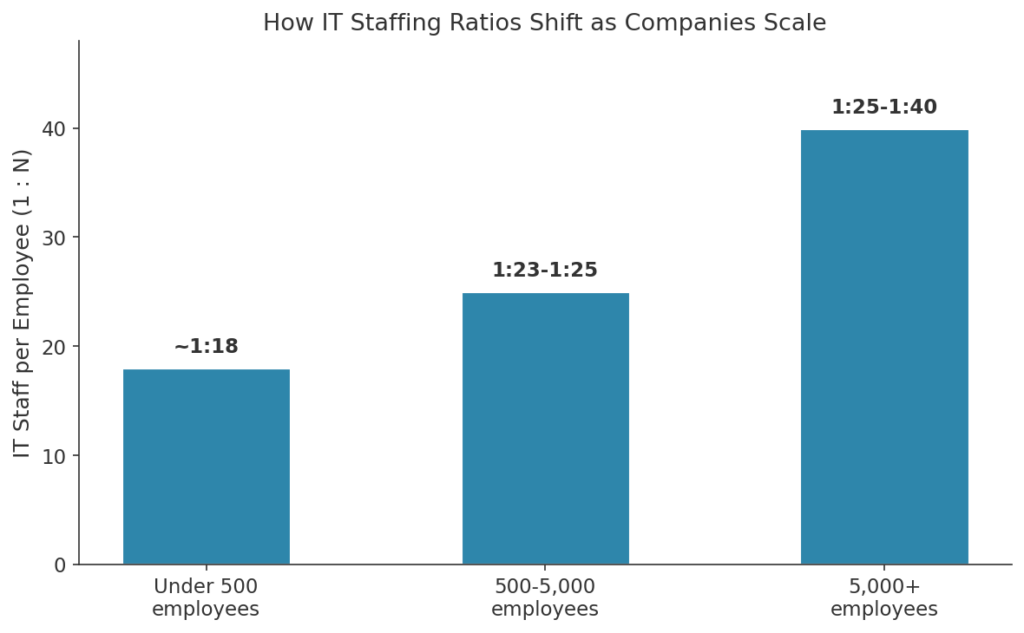
“Small businesses under 500 employees typically operate around a 1:18 IT staffing ratio; mid-size companies average 1:23 to 1:25.” — Industry IT staffing benchmark research
That shift is not just about headcount. It reflects growing complexity: more devices, more locations, more edge cases a small IT team has to handle with the same or fewer hours in the day.
What Actually Matters When Comparing Options
Scalability Without a Full Re-Platform
A tool priced and built for ten seats should not require a painful migration once the company reaches a hundred. Ask vendors directly how their pricing and architecture change at scale, not just what the entry tier costs today. Some platforms quietly restructure their permission model or admin tooling at higher tiers, and that shift is worth understanding before you are locked into a contract, not after.
Authentication That Gets Stronger, Not Weaker, With Scale
A single shared login might survive a five-person team. It becomes a liability the moment a dozen technicians, several with varying tenure and access needs, all rely on the same credentials. Multi-factor authentication and individual accounts should be standard, not an add-on reserved for higher pricing tiers.
Fit With the Systems Already in Place
A support tool that cannot talk to existing ticketing, identity, or monitoring systems creates a parallel process nobody fully trusts. Companies already securing remote desktop access across company devices know this firsthand: a disconnected tool becomes exactly the kind of blind spot a growing security program is meant to close.
Vendor Support That Scales With You
A small team of five can often get by with community forums and self-serve documentation. A hundred-person team relying on the same tool for daily productivity needs a vendor who answers quickly when something breaks, not a ticket queue that takes days to clear. Ask prospective vendors directly what response times look like at your projected size, not just your current one.
|
Pro Tip: Ask any vendor what happens to your account and data if you need to downgrade seats later. Growth is not always a straight line, and a tool that only handles scaling up can leave you stuck during a slower quarter. |
Small Team Tool vs. Scaling-Ready Platform
What works informally for a handful of people rarely holds up once support becomes a real operational function. The table below breaks down the difference.
|
Factor |
Small Team Tool |
Scaling-Ready Platform |
|
Account structure |
Shared or informal logins |
Individual, role-based accounts |
|
Pricing model |
Flat, low seat count |
Predictable per-seat scaling |
|
Integration |
Standalone |
Connects to ticketing and identity systems |
|
Reporting |
Minimal or none |
Session logs and usage analytics |
|
Support for the vendor itself |
Community forums |
Dedicated account support |
Where Network Architecture Fits Into the Decision
Some scaling companies pair their remote support tool with a broader access framework. Understanding what SASE actually combines helps explain why more growing organisations are converging networking and security into a single cloud-delivered layer, rather than bolting on point solutions one at a time as headcount rises.
Teams working through when scaling up means moving out often discover that support tooling decisions arrive on the same timeline as office and headcount decisions, not months later once the strain is already visible.
A Practical Evaluation Checklist
Not every remote support tool is built with a growing headcount in mind. Many are designed and priced around the needs of a stable, unchanging team, which is exactly the profile most scaling companies stop matching within their first eighteen months. When comparing vendors, prioritize:
- Transparent scaling costs: get exact per-seat pricing at your current size and at double it, not just an entry-tier number.
- Cross-platform coverage: confirm support across every operating system your growing team actually uses.
- Centralized administration: a single admin panel for provisioning and revoking access matters more with every new hire.
- Session logging and audit trails: useful for security reviews now and compliance requirements you may not have yet.
- Responsive vendor support: a growing company cannot afford to wait days for help with its own support tool.
If you are still asking when it’s time to hire more team members, it is worth asking the same question about your support tooling. Both decisions tend to arrive around the same growth milestones.
Getting Started: A Simple Rollout Plan
- Map your current support setup, informal or not, and identify what genuinely breaks first as headcount grows.
- Shortlist two or three vendors and request scaling pricing, not just current-tier quotes.
- Confirm authentication and session logging meet your standards before signing anything.
- Pilot the finalist with your most demanding support scenario, not the easiest one.
- Revisit the decision annually, since a good fit today may not remain one after another year of growth.
Frequently Asked Questions
When should a growing company start looking at remote support software seriously?
Before the informal setup actually breaks, ideally. Waiting until shared logins or ad hoc tools cause a visible problem usually means making the decision under pressure rather than with a clear head.
Does remote support software get more expensive as a company scales?
Usually, but predictably so with the right vendor. Per-seat pricing should scale in a straight line, not jump unexpectedly at certain headcount thresholds.
How does remote work affect IT support demand?
Remote and distributed employees tend to submit noticeably more support tickets than on-site staff, largely due to home network variability and a wider mix of personal devices.
Should a scaling company build its own remote support tooling instead of buying?
Rarely makes sense outside very large enterprises. Building and maintaining secure remote access software is a significant undertaking that distracts from the core product most growing companies are trying to build.
What is the biggest mistake companies make when buying remote support software?
Choosing based purely on today’s headcount and price, without asking how the tool and its pricing behave once the company doubles in size.
Is it worth involving IT and security teams early in the buying process?
Very much so. Skipping their input often means the tool gets replaced later once gaps in authentication, logging, or integration become impossible to ignore.
Buying for the Company You Are Becoming
The mistake most scaling companies make is not choosing badly, it is choosing for the team they have today without asking what that same tool will need to do in eighteen months. A support platform that fits now but cannot stretch turns into precisely the kind of expensive do-over growing companies can least afford, both in dollars spent twice and in the disruption of migrating hundreds of accounts mid-growth.
Evaluate against where headcount is headed, not just where it stands this quarter. The extra diligence upfront costs far less than a forced migration once the informal system finally gives out.
References
MSH, Calculate Ideal IT Staff To Employee Ratio, 2026 — https://www.talentmsh.com/insights/it-staffing-ratios
Fortinet, What Is SASE (Secure Access Service Edge)? Benefits and Components, 2026 — https://www.fortinet.com/resources/cyberglossary/sase
Splashtop, Remote Support Software, 2026 — https://www.splashtop.com/products/remote-support
Fact Check: All statistics and data points in this article were verified against original sources as of August 20, 2026. Sources are listed in the References section.