
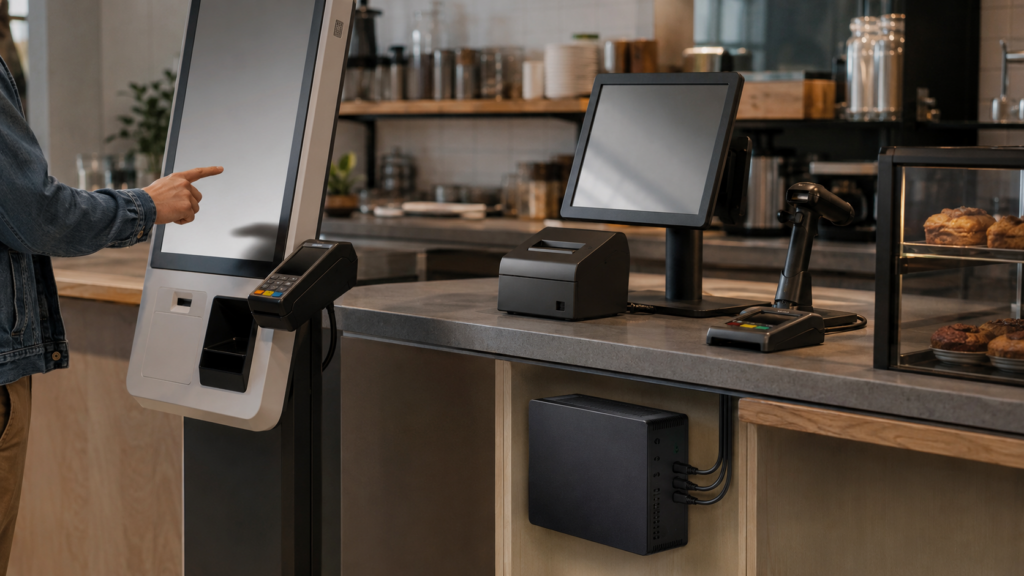
The checkout queue has started moving, then the screen freezes. A customer waits with a card in hand while someone crouches behind the counter, checking a computer that seems far too large for the job. In a kiosk, the same awkward pause feels even more exposed. You can see why compact PCs have found a place here: they keep the computing hardware close, quiet, and easier to fit around the parts people actually touch.
Small hardware, fewer awkward compromises
Space disappears quickly behind a counter. A receipt printer needs room, cables wander, and the monitor already claims the most visible spot. A compact computer can sit behind a display or under a counter without turning the setup into a knot.
Quiet matters more than expected
Fans used to make computers feel present. A quieter compact PC lets the beep of a scanner or the question remain heard. Weirdly enough, that changes the mood of a busy counter, even though nobody walks in talking about computer noise.
Keeping transactions moving
Point-of-sale work is not glamorous computing. You need the sales screen to respond, peripherals to stay connected, and the system to recover sensibly after a restart. Small hardware helps because it can be placed close to the equipment it serves, with fewer cable runs getting tugged or misplaced.
A cleaner connection path
Picture a café counter where the receipt printer sits below the display and the scanner rests beside it. A compact PC mounted nearby can keep those connections short and easier to trace. If something stops responding, you have a clearer idea of where to look, rather than following a cable maze into a crowded cabinet.
Updates need a practical routine
Software updates still need care. Schedule them outside busy periods, then restart the system and test the payment terminal afterward. The computer’s size does not remove that responsibility, but access can be less irritating when a technician checks ports or replaces a cable.
For a straightforward purchasing starting point, mini PC Canada can help you compare compact options before matching hardware to the kiosk or counter layout.
Kiosks are less forgiving
Customers do not know which part of a kiosk has stalled. They only see a screen waiting for a tap. That makes placement, cooling, and recovery habits feel connected, even if the computer itself stays hidden.
Heat has nowhere to pretend
An enclosed kiosk can trap warm air around the computer. You need a case position that leaves a sensible airflow route, with vents kept clear of dust and nearby materials. A tiny case is not automatically a cool case — sometimes that assumption causes the trouble.
Access without dismantling everything
If a technician must remove half the kiosk to reach the computer, a simple service visit becomes an event. Mounting the PC where ports, power, and ventilation can be checked makes routine care calmer. You might not notice that choice during installation, but you will notice it during the first stubborn fault.
The user experience still leads
Compact hardware should support the interaction, not dictate it. Touch response, readable screens, accessible payment positioning, and a clear path back from an interrupted transaction matter more than squeezing the smallest box into the enclosure. At some point, the hidden computer becomes less interesting than the moment it allows to pass without friction.
You will still need to match processing needs, operating system support, ports, mounting method, and service access to the actual environment. A menu kiosk has different demands from a counter handling payments.
Ask whether the station feels easier to place, hear, maintain, and recover. The answer appears after the novelty has worn off.
And if the hardware stays quietly out of the way, that is probably a good result. The next improvement may come from the layout or software.