

WordPress currently powers close to 44% of all websites globally. But when it’s having rendering issues, even a well-designed website can lose rankings and conversions.
This is where the problem becomes more technical. A WordPress page can look perfect in the visual editor, load correctly for the website owner, and still create serious rendering problems for search engines.
We’re talking about those rendering issues below. We’ll go through exactly what impacts search rankings, why they occur, and how to identify and resolve them.
How WordPress rendering problems directly harm search rankings
When Googlebot crawls a WordPress site, it doesn’t always render JavaScript the same way a browser does. Specifically, Google uses a second-wave rendering queue (we’ll go through this below a bit more), meaning some pages get crawled first in raw HTML and rendered later. This is why working with a WordPress web design agency that understands both front-end performance and SEO can make a real difference.
Let’s go through these below:
The DOM element explosion
Quite often, page builders like Elementor, Divi, or WPBakery wrap text blocks and images in several layers of code containers. A single paragraph of body copy ends up nested inside five or six div wrappers (each carrying its own inline styles, class names, and data attributes). This, in turn, creates a massive Document Object Model (DOM) tree with thousands of lines of nested code per page.
The problem here is that Google’s crawler has a crawl budget. For example, when it finds a huge DOM, it takes longer to parse the page. It consumes more processing and is more likely to time out before reaching lower sections of the page.
As a recommendation, Google advises keeping DOM nodes under 1,400 total. Across multiple sites built on these builders, it is not uncommon to find 4,000 to 8,000 DOM nodes on a standard landing page.
When page builders prioritize visual styling over proper HTML hierarchy, heading structures break. As a result, diluted topical signals make it harder for Google to interpret page relevance.
Excessive render-blocking CSS and JavaScript
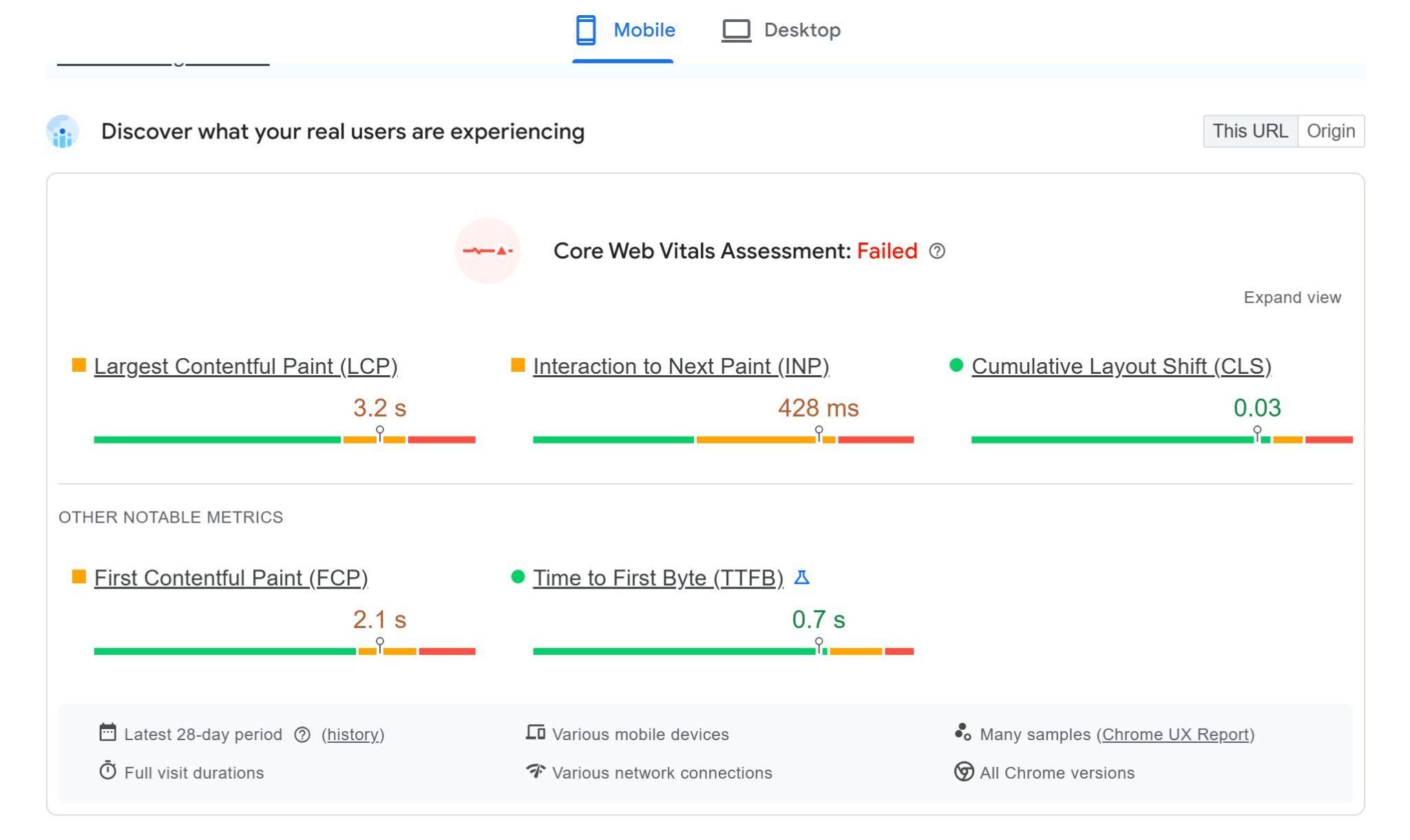
WordPress loads stylesheets and scripts in the document head by default. When a browser (or Googlebot’s renderer) sees a render-blocking resource right in the head, it stops parsing the HTML (until that file downloads and processes). This delays First Contentful Paint and Largest Contentful Paint directly. Both of them are part of Core Web Vitals metrics and are considered ranking factors today.
The problem compounds on WordPress because each active plugin contributes its own CSS and JS file. Most of them load site-wide regardless of whether the page needs them, thus overloading the page.
For example, a contact form plugin that loads its scripts on a product page without a form adds extra weight to the render path. You might have great content, but hidden issues can still hold your WordPress site back from page one. There can be issues with:
- Script count: A typical mid-sized WordPress site using a major page builder and 15-25 active plugins can load 25 to 40 different JavaScript and CSS files on each page.
- Rendering part: WordPress relies heavily on scripts that are render-blocking (by default). Without strong suspension or caching, the browser should pause HTML parsing (to download and execute them).
- LCP & Ranking core: This limitation can postpone the Largest Contentful Paint (LCP), which is a key Google ranking factor. When it consistently fails, it can impact search rankings as well.
Dynamic client-side JavaScript redirection
Let’s show this with an example. Overall, client-side redirects rely on JavaScript executing after a page loads to send users from URL A to URL B. While the visual transition can feel fine to a user, it creates a massive blind spot for search engines.
As a consequence, Google may index URL A as an isolated page, pass no link equity to the second link (URL B), and treat both URLs as separate (or competing) signals.
Googlebot does not process all redirects equally:
- Server-Side (301/308): Immediate method includes when the Googlebot hits the old URL, the server immediately hands off the new URL. Next, PageRank transfers in Wave 1 (Instant Crawling).
- Client-Side (JavaScript): This is the delayed option. In this case, Googlebot hits the old URL, gets a 200 OK status, and then puts the page into a Wave 2 (let’s call it a Rendering Queue). Rendering JS needs a lot of computing power. So, above all, it can take Google days or even weeks to run the script, find the redirect, and pass the PageRank.
Dynamic content pop-ins (unstable CLS)
Cumulative Layout Shift (CLS, which is a part of Core Web Vitals) measures how much visible content can move during page load.
On WordPress sites, pop-ins such as cookie banners, chat widgets, promo bars, and lazy-loaded blocks can push content down or sideways.
Font rendering invisible text (FOIT)
Flash of Invisible Text (FOIT) can happen when custom fonts load slowly and text stays hidden until the font file is ready.
As an example, on WordPress, this may come from themes loading Google Fonts (custom fonts without a proper font-display strategy). So basically, the text exists in the DOM, but users and Googlebot may not see it during the early render window.
Main takeaways
Even small rendering issues can cause quite big SEO and UX problems on WordPress sites. Dynamic pop-ins may increase CLS score and make the page feel unsteady during loading.
However, reserving space for widgets and using “font-display” swap can improve layout stability. Eventually, a better rendering can lead to stronger Core Web Vitals as well as better engagement and more reliable rankings.